








This website uses cookies so that we can provide you with the best user experience possible. Cookie information is stored in your browser and performs functions such as recognising you when you return to our website and helping our team to understand which sections of the website you find most interesting and useful.
We’ve built a new self-serve feature in pandoIQ that lets you give a single urgent role its own dedicated campaign and budget in three clicks. Here’s what it does and how to get started.
Programmatic job advertising is built to do something genuinely difficult: manage spend intelligently across a large, constantly changing portfolio of roles. It does that exceptionally well. Job Acceleration extends that capability into a specific scenario programmatic wasn’t optimised for: the moment when one role demands immediate attention and needs its own dedicated push, right now, without waiting.
Today, we’ve launched Job Acceleration: a new self-serve feature in pandoIQ that gives you a direct way to put an urgent role in its own “fast lane”, without impacting your main campaign.
What Job Acceleration does
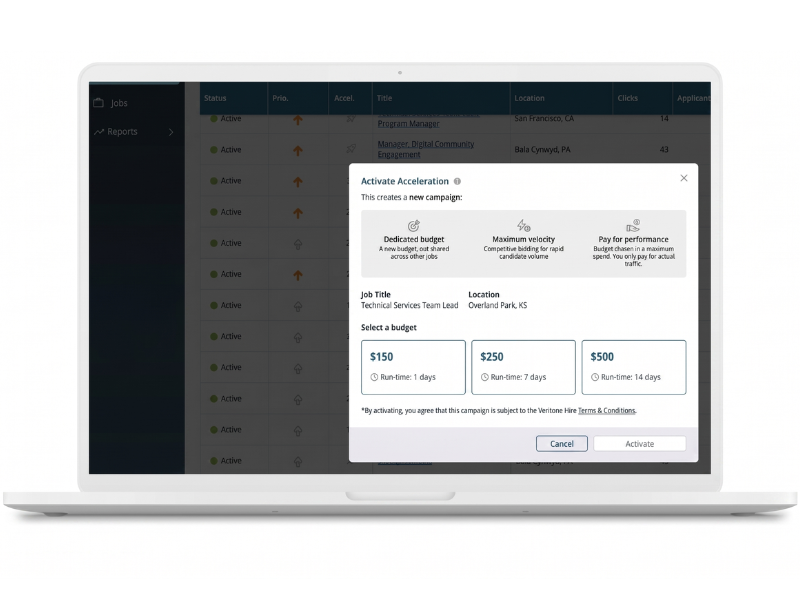
When you identify a job that needs a push, Job Acceleration moves it into its own dedicated campaign with its own budget and a delivery strategy built for speed. Your main campaign keeps running exactly as before.
When the acceleration period ends, the job returns to your main campaign automatically. You only pay for what’s actually spent.
The whole process takes three clicks.
How it works
- Find the urgent role in your pandoIQ dashboard and click the rocket icon.
- Choose a package: $150 for 5 days, $250 for 7 days, or $500 for 14 days.
- Confirm. The job moves to its own dedicated campaign immediately, using a separate budget that doesn’t reduce your existing campaign spend.
When the period ends, the job reverts to your main campaign seamlessly. If you need to cancel early, you can do that at any time.
You can track performance in real time from your existing dashboard view. No new logins, no new interfaces. Click Stats on an accelerating job to see clicks, applicants, spend and conversion rate as it happens.
Why we built it
We built Job Acceleration in direct response to feedback from our customers. The pattern we kept hearing was consistent: recruiters managing high volumes of jobs needed a way to be reactive when something became genuinely urgent, without disrupting everything else they had in flight.
What was missing was a simple, self-serve mechanism that isolated the urgent job and gave it its own resource.
“This has been an absolute game changer for us. We have so many times needed to be reactive, and here it is. This is how we can do that.”
Megan Gebbie, SOS Group
SOS Group took part in our beta programme earlier this year, alongside two other staffing clients. The feedback from all three shaped the feature you’re using today.
A few things worth knowing
It’s pay-for-performance. You’re billed only for what’s actually spent, up to the package amount.
It doesn’t touch your main campaign. The acceleration budget is separate and additional. Your existing campaign spend is unaffected.
Your ATS doesn’t need to change. Traffic routes to the same job. Pre-Screening Questions are automatically carried across to the accelerated campaign.
Advanced Editor access is required to activate. All users can see the rocket icon in the dashboard. If you’d like to check or update your access level, speak to your Account Manager.
Get started today
Job Acceleration is live in pandoIQ now. Log in and look for the rocket icon next to your active jobs.
If you’d like to talk through how this can work for your particular requirements, or if you have questions about access, your Account Manager is the best place to start.